









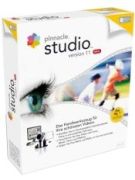
Ilustrācija var atšķirties
Pinnacle Studio 11 Standarts
Ražotājs: Pinnacle
Ilustrācija var atšķirties
- Video rediģēšana
- Ierakstīšana no DV un Digital8 videokamerām vai videorekordieriem
- Ierakstīšana no analogu videokameru, 8 MM, HI 8, VHS, SVHS, VHS-C, SVHS-C vai videorekordieru avotiem (NTSC/PAL/SECAM)
- Izvade uz DV vai Digital8 lentu
- Izvade uz analogu video lentes kaseti
- Importa formāti: DV, AVI, MPEG-1, MPEG-2, DivX, MPEG-4, 3GP (MPEG-4), WMV, WAV, MP3, BMP, JPG, PCT, TGA, TIF, WMF
- Eksporta formāti: Video CD (VCD), S-VCD, DVD, DV, AVI, DivX, RealVideo 8, Windows Media 9, MPEG-1, MPEG-2, MPEG-4
- Sistēmas prasība: DVD-ROM, 1GB cietā diska atmiņa, 512MB RAM, Windows XP ar SP2

Ražotājs:
Pinnacle
Populāri produkti
Pinnacle Studio 24 Ultimate
no 37,58€
Cyberlink PowerDirector 365
no 52,00€
Magix Video Easy Deluxe
no 9,10€
Roxio Game Capture HD Pro
no 109,63€
Ashampoo Movie Studio Pro 3
no 11,67€
Cyberlink PowerDirector 8 Ultra
no 54,17€
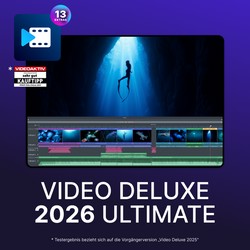
Magix Video DeLuxe 2026 Ultimate
no 90,00€

Magix Video DeLuxe 2026 Plus
no 44,00€
1 Piedāvājums
izkārtojums:
Labākā atbilstība
Labākā atbilstība
Cena: Zemākā
Cena: Augstākā
ar piegādi
Pinnacle Systems Pinnacle Studio 26 Standard Official Website Key GLOBAL 61e59688-501a-11f1-ac89-f6e89983a5e8
Create polished videos with Pinnacle Studio. Use it to edit clips, add effects, build smooth transitions, improve audio, create titles, record your screen, and turn raw footage into finished videos. Whether you are making YouTube content, family videos, travel edits, tutorials, social media clips, or more detailed creative projects, Pinnacle Studio gives you the tools to shape your footage the way you want. Pinnacle Studio is made for video creators who want more control over the editing process. You can cut and arrange clips, work with multiple tracks, adjust colour, add motion effects, use masks, create picture-in-picture layouts, and export your finished video for sharing. It is a strong choice when you want editing software that feels approachable but still gives you room to build more advanced projects as your skills grow. What can I do with Pinnacle Studio? Use Pinnacle Studio for: Video editing. Cut, trim, split, arrange, and combine clips to create clean videos for personal, creative, business, or online use. Timeline editing. Build your project with multiple tracks, layer footage, add images, place audio, and organise your edit with more precision. Transitions and effects. Add smooth transitions, creative filters, motion effects, overlays, and visual styles that make your video feel more polished. Titles and text. Create intros, captions, lower thirds, credits, labels, and animated text for tutorials, presentations, social videos, and storytelling. Colour correction. Adjust brightness, contrast, saturation, tone, and colour balance to make your footage look cleaner and more consistent. Screen recording. Record your screen for tutorials, walkthroughs, online lessons, software demos, gameplay clips, and training videos. Audio editing. Improve sound, add music, adjust volume, mix voiceovers, balance tracks, and make your video easier to watch and hear. Motion tracking. Track moving objects and attach text, graphics, effects, or blur to parts of your video for a more dynamic edit. Video masking. Create more creative edits with masks, selective effects, layered visuals, and focused adjustments in specific parts of your footage. Chroma key. Use green screen tools to replace backgrounds, create studio-style videos, or add yourself into different scenes. Multi-camera editing. Combine footage from different camera angles and switch between views for events, interviews, performances, and YouTube videos. Video exports. Export your finished videos in formats suited for sharing, uploading, archiving, or playing on different devices. Bring your video ideas to life with Pinnacle Studio Pinnacle Studio helps you move from scattered clips to finished videos that feel clear, creative, and ready to share. You can start with simple edits like trimming, transitions, and music, then use more advanced tools when you want to add motion tracking, masking, multi-camera edits, or stronger visual effects. That makes it useful for beginners who want to learn and for creators who want more control without making the workflow feel too heavy. Choose Pinnacle Studio when you want video editing software that supports everyday projects and more ambitious creative work. Use it to tell stories, build tutorials, create content, preserve memories, or polish videos for your audience. From your first cut to your final export, Pinnacle Studio gives you the tools to make your footage look more professional and more personal.

27,49€
27,49€
piegādes maksu skatiet vietnē
piegādes maksu skatiet vietnē
Produkta dati
| Ierakstīšana no DV un Digital8 videokamerām vai videorekordieriem |
| Ierakstīšana no analogu videokameru, 8 MM, HI 8, VHS, SVHS, VHS-C, SVHS-C vai videorekordieru avotiem (NTSC/PAL/SECAM) |
| Izvade uz DV vai Digital8 lentu |
| Izvade uz analogu video lentes kaseti |
| Importa formāti: DV, AVI, MPEG-1, MPEG-2, DivX, MPEG-4, 3GP (MPEG-4), WMV, WAV, MP3, BMP, JPG, PCT, TGA, TIF, WMF |
| Eksporta formāti: Video CD (VCD), S-VCD, DVD, DV, AVI, DivX, RealVideo 8, Windows Media 9, MPEG-1, MPEG-2, MPEG-4 |
| DVD-ROM, 1GB cietā diska atmiņa, 512MB RAM, Windows XP ar SP2 |
Populāri produkti
Top Produkte





Populārākās meklēšanas
PinotexPinotex Extreme LasurPinotex Krāsa KokamPioneer Plašu AtskaņotājsPiparu DzirnaviņasPirelli Scorpion R21Pirmās Palīdzības Derīguma Termiņšpirts krāsnisPla 2.85 mmPlanšetdators Ar KlaviatūruMacins StudioFL StudioApple Mac StudioApple studio displayBeats Studio BudsBeats Studio ProBeats Studio 3Visual studio 2022Davinci resolve studioVega 11
